Follow Us On:
Follow me on Twitter  RSS Feed

Website Browser Safe Fonts

Browser Safe Fonts

Posted on May 24, 2005


Pro Tip #7

You need a plan to update, maintain, and improve your website on a monthly, if not weekly basis.

Hire AHFX.net

Call (208) 419-0868
E-mail or Request a Callback

Related Articles For You

I have been asked many times why people always use Times New Roman or Arial on their websites. Unfortunately, the reason is very simple. There are only a handful of fonts that look similar that are installed by default on both Windows and Macs. Consequently, these "browser safe fonts" find their way into almost every website out there. We've compiled an image from screen shots from a Windows machine and a Mac to show the browser safe fonts and how they compare on each platform.

The black text is Windows and the blue text is from a Mac.
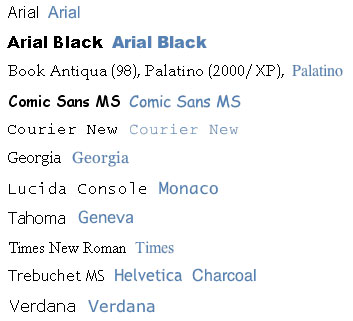
List of 
browser safe fonts

As you can see, even the so called "similar" fonts don't always look the same. My statistics professor's motto "close enough is good enough" seems to be the stance I take on these font differences. Now, although you can define numerous font-family items in your style sheet, these can greatly change the way your page lays-out on different machines. I'm more for choosing one of the browser safe fonts and using it, so I don't have to worry (as much) about how everything will look to people on Macs.

Hopefully Windows, Apple, Linux, Unix, (any other *nix system) will learn to play nice and give the web designers in the world a bigger toolbox to play with. Until then, I think we should all get a little more comfy with Arial and Times New Roman.

You should follow me on twitter here Follow me on twitter

Get Started Now

Go to our information sheets to
start building your website today!


Related Articles


Filed Under: Fonts, Browsers, Website Design
 
Please feel free to leave a comment or question about the article
"Website Browser Safe Fonts"

:
:
:
Comment:
  [Security Code]

Comments

1

Carol Oct 5, 2006

I reminded someone I work with to use browser safe fonts on her website. She asked me today why she can see fonts on some websites that she knows she doesn´t have installed on her computer. Is that possible? If she wants fancy fonts on her website and she downloads them, aren´t the viewers going to see one of the fonts above as a replacement?


2

AHFXStudios Oct 5, 2006

Carol. More than likely the text that is in a different font that isn´t installed on her computer is coming from one of three ways.


  • The "text" isn´t really text, but an image.

  • The text has been embedded (normally this means larger file downloads) or is in a flash movie or the like where they embed the font into the animation.

  • She doesn´t realize that that font is installed on her computer.

Anyway, to answer your second question, you are absolutely correct that if the font is not found on the user´s computer that it will be rendered in a different font which will normally be one of the above fonts.


3

Other Fonts May 27, 2008

Other fonts and their ubiquitous rates at http://www.3point7designs.com/blog/2008/05/08/8-fonts-you-probably-dont-use-in-css-but-should/


4

Alvin Jan 8, 2010

How can I use the font kunsler script on a Yola site, also, can I add window media player safely? Thanks