Fix Your Dell 3100cn Streaking Issue
Dell 3100cn Streaks
Posted on Feb 09, 2008
Pro Tip #12
Slow load times is the number one reason 51% of people leave websites.
Become a Client
Call (208) 528-6748
E-mail or Request a Callback
Well after owning my Dell 3100cn for a very very very long time, I've finally found out how to get rid of streaks that were running down the middle of the page on color prints.
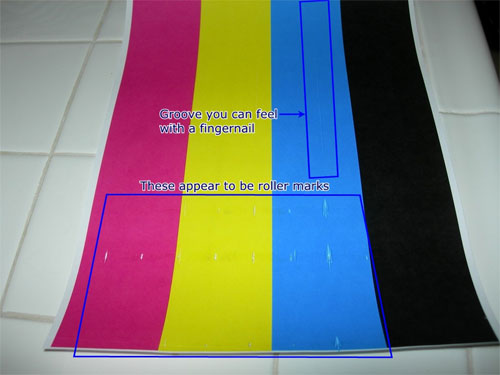
Well today, I found an answer that immediately fixed the problem within about 2 minutes. I found a great article that shows that the culprit is bad design of the imaging drum inside the 3100cn. Here are the instructions on how to fix it: (This will void your warranty with Dell so DON'T DO THIS IF YOU DON'T WANT YOUR WARRANTY VOIDED. WE ARE NOT RESPONSIBLE FOR ANY DAMAGE THAT OCCURS FROM THESE STEPS:)
- Remove the drum unit from your 3100cn.
- Set the drum unit on a clean level surface and avoid touching the drum or the transfer belt (the decal with 4 arrows points to the transfer belt).
- Remove the 6 screws from the top cover (the cover has the blue handle attached). Two screws are on top at both ends of the blue handle. The next 2 screws are on the sides and line up with the decal with 4 arrows. The last 2 screws are also on the sides and at the lower corners of the big decal that shows how to remove the drum unit from the 3100cn.
- Carefully lift the cover from the drum unit and cover the drum unit with clean paper to protect the transfer belt from bright light. You can carefully reinstall the drum unit without the top cover and run some color prints. If the lines are gone then continue with step 5.
- Look at the ribbed side of the top cover. Some may show some toner build-up. Some of the rib intersections are too high and are dragging in the toner that is applied to the transfer belt. The ribs are there to add stiffness to the cover and to keep it from bowing.
- Place the cover handle side down on a clean towel.
- Using a palm sander with 320 grit sandpaper and light pressure (the weight of the palm sander) sand until the ribs going both directions are showing signs of being sanded. You will be able to see the difference as unsanded areas will be glossy and sanded areas will have a dull finish.
- Switch to 600 grit paper and do a light sanding.
- Wash the cover under cool water. Don't use hot water since that could cause the cover to bend.
- Dry completely. I used compressed air.
- Reinstall the cover to the drum unit. Tighten the 4 side screws first and then the 2 top screws last.
- Put the drum unit back into the 3100cn and try a color print.
- Please post if you have any questions about the procedure.
- If your next drum unit has the same problem you can swap top covers.
Well I am now very happy that my Dell 3100cn prints without any streaks. A little background will help you figure out why I'm so happy.
I got a Dell 3100cn printer a couple of years ago. I had a friend that had one and I loved the way it printed and everything about it, so I decided to get one of my own. After setting it up, I printed a few sheets and all of the color prints had streaks or lines that ran down the middle of the page at extremely regular intervals on every print. I called Dell and they shipped me a new printer drum. It didn't fix the problem. They had me ship the printer back and they sent me a used printer. (I was upset because I figured I'd get a new printer... but that is a different story.) This one wouldn't even fire up. It kept giving an error about temperature. They sent out a tech and he replaced some controller. It didn't fix the problem with the error message. So I sent that printer back to Dell.
Finally they sent me another printer that streaked again. I was fed up by then and found that if I printed enough pages the printer would "warm up" and the streaks would go away. So any time we wanted to print anything in color, we'd just print about 150 black and white pages of whatever and then print our color pages.
Get Started Now
Request our information sheets to
start building your website today!
Browse By Category
Filed Under: Printer, Dell 3100cn, Streaks
Please feel free to leave a comment or question about the article
"Fix Your Dell 3100cn Streaking Issue"
Comments
2
Donald Feb 24, 2008
I tried this today and I still have what you called "roller marks" when printing color only. None of the ribs inside the cover appeared to have built up toner. Any thoughts on how to get rid of these roller marks? Thanks!
3
bosque Mar 31, 2008
I sanded down the areas with built up toner and the streaks are now more noticeable. I left off the drum cover off and it prints fine. Guess I´ll just leave the cover off from now on.
4
Brian Kernan Apr 7, 2008
This is the solution I have been looking for. The first time I must not have sanded the cover enough, ´cause although streaks were reduced 95, there was still on e there. after sanding a little more streaks were gone and I was able to print my DVD case covers for my business again. I did do one thing differently. I added paper washers under the cover, on the top screws to add hieght. The washers were the ones you would find holding down a MotherBoard.
Thanks for you help.
5
Brian B May 24, 2008
This is great. I have been unhappy about the streaking problem for a long time and this did the trick.
However, I did not use a power sander. I just filed down the high spots and then went over all those areas with fine sand paper (on a block). It appears that things just needed to be smoothed out.
6
Vic Jun 1, 2008
Take the lid off the drum and keep it off. that is the easiest fix. Or, clip the lid and just keep the small section with the handle, and use the two screws on each end. Make sure you sand down the ribs and rough edges that remain. This way you can at least have a handle to help you manage your printer. This is a pretty unsophisticated repair, and a major disappointment. Dell should offer a recall for this problem, and free replacement parts for owners of this printer – whether the warranty is still active or not.
7
doug Jun 25, 2008
i have a void down the right side of the print about 1.5 inch? color or black.
8
Naturelimit Jul 15, 2008
They had me ship the printer back and they sent me a used printer.
9
ed Sep 4, 2008
Excellent posting. I was just about to order a new drum kit, as I figured that was the reason for the streaking. Good thing I came across this post. Saved me a bunch of money! Thanks!
10
Bill Oct 10, 2008
Hey - thanks for the tip, did this and it fixed the streaks, now I just need to figure out the two dark lines and toner "dot" issue I have. Thanks again!
11
tony Oct 11, 2008
I´ll try this but also am loosing print on the right side of b/a and color printing as well as streeks on color. Any suggestions . I just put new drum in and streeking on color was there from the beginning woe the streeking happen right away, drum was remanufactured. Also can these printers still be purchased?
12
rocaveli Nov 7, 2008
thanks for your post! have the same problem as you, not sure if I´m up to sanding down my drum cartridge yet but I might get there
13
Patrick Nov 28, 2008
Thanks, you´ve just made my weekend. I have been having this problem since I bought the printer from ebay (for cheap). With this fix I´m sure I´ll enjoy using it for the next couple of years.
14
Sach Jan 9, 2009
I have same problem with Tony. The right sids of
the printout is truncated, disappeared. Not only
K,Y,C but also M. Its band is about 1 inch.
In this area, first color is dim, then disappeared. I replace the new drum, 4 new toner cartridges but it is not better.
Any help or advices are very appreciated.
15
Andy Jan 14, 2009
Awesome - this worked for me. I had the exact same problem, followed your instructions, and the printer is like new again. Thanks!
16
Andrew Jan 14, 2009
Thanks so much for posting this. It worked for me with a 3000cn that was acting up. I ended up leaving off the two screws closest to the exposed end of the transfer belt and adding a couple of washers under the screws near the handle (as suggested on the dell forum). It was a bit difficult to wiggle back in the machine, but works wonderfully now.
17
Avery S Jan 17, 2009
We have the same printer and problem I´m working on now. Howeve, we also have a vertical void 1/8 in. thick on the whole page in only blue. I traced it to the blue developement roller, which has a corresponding void band of blue developer. I suspect lint, hair, etc., has gotten in the blue toner (reman) and clogged this area behind the doctor blade. Does anyone have a teardown diagram or know where I can get one for the developement section of this printer?
Thanks.
18
Jesse Jan 22, 2009
Thanks for taking the time to provide your great fix steps. I took the drum cover off, sanded it down with an orbital sander, washed, dried, and put it back on. It totally fixed the short smear lines shown horizontally across the page in your example. Thats been an annoying issue for almost 2 years. Unfortunately I still have soft faded vertical streaks that run top to bottom where it looks like the ink (regardless of color) is barely printing. One is 1/4" wide and runs exactly down the center of the paper. The others are narrower. This second issue appears to be something different than the drum cover rubbing the paper.
19
Bruce Jan 30, 2009
tried this out after replacing the drum unit did not fix the problem. Took 5 minutes and fixed a very longstanding and annoying problem! Great work.
20
Kurt G Feb 14, 2009
Thanks for identifying a great solution to a problem I have experienced on two 3100 printers. I have kicked myself a hundred times for not sending the printers back when I first got them due to this issue. The solution solved 95 of the streaking. There is still one small point that I cannot solve even after repeated sanding. Will try adding a thin washer next time I open it up. as suggested by Brian Kernan below.
21
Chuck M Mar 27, 2009
Thanks for the tip. I also find that if I turn on the printer about 30 minutes before I´m ready to use it, the printer warms up more and that also helps to alleviate the problem.
22
Jonathan Apr 2, 2009
Just so everyone knows, the problem is a defection drum unit design. Dell replaced mine (along with many others) free of charge, and the problem completely went away. They may still be replacing them for free, check out the Dell forums. Cheers.
23
Idaho Falls SEO Apr 3, 2009
Jonathan, I had my drum "replaced" a couple of times by Dell and it never fixed the problem. Unless they have changed the way they are making the drum, there will be some that have the problem.
24
James nielander Apr 29, 2009
We are having the same problem that Tony and Sach has. It dissappears at the right. Can this be fixed by replacing the drum or does anyone know what can be done?
25
John Rives Jun 22, 2009
Thanks for the info. I was thinking I might have to replace the drum, but this little trick fixed my 3100cn good as new. Thanks for the post and instructions


1
ender Feb 17, 2008
i can´t wait to try this out! i´ve just started having this issue after owning the machine for a year or two and i´ve been searching for a good solution. i love the machine, but it´s been unusable for anything except b/w printing for about two months now.